Showing posts with label google. Show all posts

Saturday, 18 August 2012

Exporting a 2 week timetable

As a fully paid up convert to all things google, and as someone who likes electronic solutions (preferably cloud based and synced across platforms and devices) my timetable has been annoying me for some time. 

What I've wanted is a quick way to get a 2 week timetable out of Sims and into either google (my choice) or outlook (what some people would prefer). A quick google will suggest this is not trivial, so I'm sharing here my own work around.

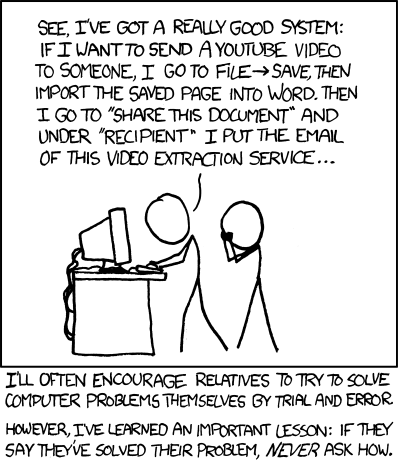
To be warned, it feels a little like this.

You haven't asked how, but I'm going to tell you anyway.  (I know there are people at school who will want to know).

1.  Type your timetable into excel.  You need certain column headings, but because I'm nice like that I'm just going to share my spreadsheet with you (Here - you'll need to download it and edit).  I've only typed in one fortnights worth of TT, the rest is called by an =C3 type cell.
The "Day" column is numbered 1 (for Monday of Week A) through to 10 (Friday week B).
The Start date column is then a vlookup.

2.  Copy all but the first column and then "paste Special - Values" into a new spreadsheet.  You may want to format the columns for date and time so that they look like dates and times.  Save this as a CSV file.

3.  Import into either Google Calendars, or into Outlook.


I've only done term 1 so far.  This is as my timetable may change early on (I blame the timetabler (me)).  To get term 2 in after half term, all I think I need to do is change the date attached to the value 1 on sheet 4, and re-copy / paste.


Feel free to tell me how much like nonsense all of the above is, and what the better way is....

Saturday, 23 July 2011

Me and Google+

There has been quite a lot written about google+, and how it is the same / different to twitter / facebook / blogging / everything else.  This is just my attempt to clarify in my mind how I might be using it in the future, and how it fits for me with all of the above.

Let just start  by saying I don't facebook.  I've never felt the need to particularly.  On the whole I stay in touch with real friends by email phone and text, so have never really seen the point.

I could ramble on for ages, but this is how i see things panning out for me...

Twitter will continue to be the main form of sharing ideas and engaging in conversations. I like its openness, and that many people will see - you may get responses you don't expect and that challenge your thinking, and that is a good thing.

For me, circles are the usp for google+. I envisage using it as a collaborative tool at school, using circles as a way to direct and focus conversations.  Assuming I can persuade enough people to sign up (and I've already got our new eLearning coordinator on side, which is a good start) here is how I hope it might look soon.

A Maths circle, containing my team. We already use GDocs readily, but a forum we can discuss things could be really powerful

A Year team circle. If all Y11 tutors and our HoY belong to a circle then issues discussion points etc can be raised in between meetings.

A maths management circle of me with my TLC's.

An eLearning group circle.

Some might (will) say that this can all be done through forums on our VLE, but circles offers something different to this. If I am discussing Y11 exams with the maths circle I can post it to the Y11 team also.  The VLE doesn't support this (I don't think). 

To summarise...

Facebook isn't (currently) for me
Twitter is for open chat, albeit with a professioanl focus.
Blogging is for reflection, a place to publish thought out and slightly more polished thoughts.

Google+ is for collaboration, both in real time (with huddles, which i haven't played with yet) and as a forum that allows cross pollination between circles.

I would love to hear other peoples thoughts on all of the above.

Monday, 14 June 2010

Why Google has been blocked

Copy of FAQ of Why Google has been blocked.

Having found out by chance that Google was to be blocked at school this morning, and only finding out by chance from a friend, I started emailing around school & County. This is a copy of the FAQ I got back. What I'm just as concerned by is that when I contacted school, it seemed that I was the first to know about this. I'll let you know how I get on in my campaign to get Google re-instated in school (for Staff & Students).


Frequently Asked Questions

Why has Google “search over SSL” been blocked.?

The Google’s Search over SLL” effectively by passes any filtering controls that schools / local authorities/ SWGfL has for the use of Google search engine. Typically the normal settings which schools would use are:

· Search term filtering - the ability to prevent certain words from being used when performing a search.

· Content filtering – the ability of SWGfL SafetyNet to dynamically read the results from a search and if inappropriate content is found in the results block the display of that page.

· Control the access to Goolge’s safe searching features so that individuals cannot select the “do not filter my search results”, options

Without these controls anyone using Google’s “search over SSL” has uncontrolled access to the search engine.

The beta version of Google’s “search over SLL” current searches, web pages, Videos, Books, News, Blogs, Updates and discussions. Please note that the video search also return thumbnail images which are not filtered.

You need to be aware that blocking https://www.google.com also prevents access to Google applications where you need to login to the service, for example Gmail.

Does this affect Google’s normal search?

No. All other Google search engines will work. e.g. http://www.google.com, http://www.google.co.uk etc

When was Google’s “search over SSL” Blocked ?

The decision to block Google’s “Search over SSL” was taken by Local Authorities and the SWGfL after consultation with experts in the field, Lawyers and Local Authority Staff. Emails were sent to Headteachers at schools in each Local Authority on the 8th 9th June 2010 explaining the decision. The Block came into effect on over the weekend 12th 13th June 2010

Are there any other implications of Blocking https://www.google.com ?

A side effect of the blocking is that it also blocks the ability to log in to Google applications such as Gmail. The SWGfL is investigation potential solutions and is in dialog with Google to try and find an alternative.

Can schools unblock Google’s “search over SSL”?

The short answer is “Yes”, however schools need to be fully aware of the implications in that unblocking https://www.google.com , basically gives any user in the school uncontrolled access to the search engine.

Schools can request to have https://www.google.com unblocked by

a.) Visiting the web page at .... completing the form
or if having difficulties by:


b.) Calling the SWGfL help desk

c.) Or your Local Authority support

SWGfL SafetyNet will be updates to enable schools to make these changes, planned for the week beginning 14th June, but only for those schools using the latest version SWGfL SafetyNet . An update for the older version is planned for later in June.

What happens when a user tries to access https://www.google.com when it is blocked ?

For most users there will not be a filtering messages, users will see a browser message explaining that the pages was not available.

Some Scenarios with advice following the blocking of Google’s “search over SSL”

1. School requires access to Google search engines

Impact: Low.
Schools will be protected using SWGfL SafetyNet as before. The search engine http://www.google.com, and http://www.google.co.uk are still operational

2. Some members of staff need to continue to use Gmail and/or other Google applications requiring you to log in.

Impact: Medium.
The blocking of https://www.google.com will prevent staff from logging into Gmail and other Google applications. Schools are asked to consider the use these services and if required then schools are able to make use of the staff proxy functionality. This feature of SWGfL SafetyNet enables members of staff to have a username and password that allows unfiltered access to the Internet from certain dedicated computers in the school and consequently access to https://www.google.com whilst other users remain blocked.

3. Staff and pupils require access to Gmail and other Google applications requiring you to log in to access the service

Impact: High.
The blocking of https://www.google.com will prevent access to the Google applications. Schools will need to consider the implications for unblocking https://www.google.com for the whole school and the processes they will put in place to monitor pupils access of the Googles search over SLL” . It is recommended that any school considering this option contacts their Local Authority for advice.

The SWGfL have made available a web page to request that Google’s “search over SSL” is made available to the school, and consequently access to Gmail and other Google applications .

Web Page .....