Written after our trip to Legoland.
I understand queueing. I am British, after all! I get the idea that one waits, until it is ones turn.
I understand supermarket queueing. I like the challenge of looking for the shortest (time not distance) queue. I appreciate the Post Office style 'Cashier Number 5 please', mainly because although it is a longer queue it keeps moving along steadily
I don't like it when people push in. I can cope with people returning to a queue after a small child needs the toilet (been there!), and just about with a person catching up with the rest of their group (although part of me thinks that the rest of the group should let people through until the left behind member catches up naturally).
What I don't understand are theme park Q-bots.
Q-bots are virtual q-ers. They allow you (at an extra cost) to be in a virtual queue, and turn up when at the front, to get on the ride. I should point out that this idea is not exclusive to Legoland. Most theme parks, I believe have something similar. There is now also a Q bot express, for even less queueing!
There are 2 issues here.
1. I don't think it's fair that just because someone has more money they shouldn't have to queue. I've payed plenty for my ticket! (actually I haven't, I've used tesco clubcard vouchers, but in principle). They also board the ride first, meaning they get the best seats, every time, whether you like the front of the roller coaster, or the back, or the seat by the giraffe on the train. That's not fair either.
2. The signs everywhere state that this system doesn't make queueing time longer for anyone.
It's this 2nd statement with which I take exception, from a mathematical point of view. It certainly feels longer.
Case study 1
I'm in a queue for a little roller coaster. The roller coaster seats 12, and there are 6 people in front of us. I feel I should get on, but 6 people roll up the qbot line, so I don't. That feels like a longer queue. (and multiply that for every time the queue should move forward 12 spaces but only does 6).
Their argument is that I haven't waited any longer, as those people would gave been in front of me in the queue - they were there virtually, so I would have had to wait that long, I just didn't see the people.
Case study 2.
We've split up, I'm with 2 of the kids queueing for ride A. Mrs S is with 3rd daughter queueing for ride B. In front of me is a virtual family (but I don't know it). They would queue for ride A, but are richer than me, so don't really have to. How do their real selves spend the extra free time? By queueing for ride B, meaning the rest of my family are also queueing longer because of the same people.
That's the flaw in the argument as I see it, that 1 person can be in two queues at the same time and that must make total queue time on the park longer. It also makes the shows / shops etc busier
Either their argument is flawed, or mine is. Which?
Disney, btw and IMHO have a much fairer system, just for the record, as everyone can fasttrack 1 ride at a time, and there is no paying extra involved.
Sunday, 22 August 2010

Sunday, 8 August 2010
TweetDeck - multiple accounts
A few people have asked recently how to set up (and manage) multiple twitter accounts. This is mainly in the light of #twittereducator and @tweetingeducatr, but I've been running two accounts for a bit (I know many others are too).
Step by Step guide... (Pictures will follow)
1. Set up a 2nd (3rd, 4th) account on twitter. Please remember all usernames and passwords!!
2. Open T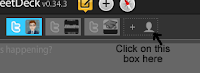 weetdeck. Click on "Add more accounts". It's one the Top left of the page, next to the blue icon with your Avatar on it.
3. When the Tweetdeck settings page appears, Click on Add new account, and choose Twitter. Type in the details, and CLick Verify. Simples.
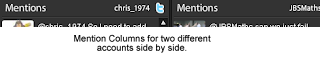
4. You will get a grey icon at the top, next to the blue one. Whichever one (or ones) a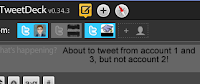 re blue, you are tweeting from, if it is grey, it is not active. When you add columns, you'll be asked for which account.
5. Replies are automatically sent from the account you are replying too.
Questions?!! Like I said, a bit of a rush!
Step by Step guide... (Pictures will follow)
1. Set up a 2nd (3rd, 4th) account on twitter. Please remember all usernames and passwords!!
2. Open T
 weetdeck. Click on "Add more accounts". It's one the Top left of the page, next to the blue icon with your Avatar on it.
3. When the Tweetdeck settings page appears, Click on Add new account, and choose Twitter. Type in the details, and CLick Verify. Simples.
4. You will get a grey icon at the top, next to the blue one. Whichever one (or ones) a
 re blue, you are tweeting from, if it is grey, it is not active. When you add columns, you'll be asked for which account.
5. Replies are automatically sent from the account you are replying too.
Questions?!! Like I said, a bit of a rush!

Saturday, 7 August 2010
#TwitterEducator
Firstly, can I apologise NOW for wrong use of apostrophes. When typing twitter #tags, if you want to pluralise (is that made up too?) the tag, you cannot just put s on the end or it becomes a new tag. Therefor here when I'm typing tags I'll stick to that convention.
I've really grown to like #ukedchat. It's a great way to network, but with more of a focus than your usual ongoing teacher chat. At the end of each week, there is usually a suggestion to BlastFollow all #ukedchat-ers. Blast Follow is a way to follow ALL people who post with a particular tag.
Then the other day there was the suggestion (I think from, but certainly blogged by @primarypete_) that we tweet #twittereducator, and then blastfollow that tag.
I wasn't convinced. I've found that twitter following is a bit like boiling a frog. You can keep up when you follow 12 people, and wonder how people keep up with 50. You get to 50, and thats fine, but how can people manage to follow 100? By 100, you're doing fine, but there are people who follow 500. And so on. I also tend to follow people with whom I've intereacted, either generally or through a tag such as #movemeon, #ukedchat, and recently #pgcetips.
I know at least one other tweep out there felt the same, as I saw their tweet on the matter, so I got to thinking a solution. Then it came to me - lists. If I set up a list of #twittereducator's I could keep an eye on their tweets, and then follow them if I liked what they said enough. The trick was going to be how to set up the list, as I knew no way (and nor did my pln or google) of turning a tag into a list.
However I did find a solution. If there's a better way, let me know. I created a new twitter account, called @tweetingeducatr. I wanted @twittereducator, obviously but you cannot have twitter in the name and you can only have 15 characters, so I now know!.
This account blastfollowed #twittereducator, and then using tweetdeck I copied all of the people into a list, which I now share. Rather than all following all of the tag, you can keep an eye on the list, and like me individually follow the ones you like the look of. My Tweetdeck columns are getting a little out of hand, now I have 3 accounts, but that's my problem! I don't anticipate tweeting from the new account very often, except maybe to remind people the list is there to follow if they want. If you like the idea, the list is here.
Could it be done differently? Is this useful? Let me know.
PS1. Here is @dughall's link - http://twitter.com/Tweetingeducatr/twittereducator/members
PS2. Here is the XKCD cartoon I'm reminded of when reading my post.

I've really grown to like #ukedchat. It's a great way to network, but with more of a focus than your usual ongoing teacher chat. At the end of each week, there is usually a suggestion to BlastFollow all #ukedchat-ers. Blast Follow is a way to follow ALL people who post with a particular tag.
Then the other day there was the suggestion (I think from, but certainly blogged by @primarypete_) that we tweet #twittereducator, and then blastfollow that tag.
I wasn't convinced. I've found that twitter following is a bit like boiling a frog. You can keep up when you follow 12 people, and wonder how people keep up with 50. You get to 50, and thats fine, but how can people manage to follow 100? By 100, you're doing fine, but there are people who follow 500. And so on. I also tend to follow people with whom I've intereacted, either generally or through a tag such as #movemeon, #ukedchat, and recently #pgcetips.
I know at least one other tweep out there felt the same, as I saw their tweet on the matter, so I got to thinking a solution. Then it came to me - lists. If I set up a list of #twittereducator's I could keep an eye on their tweets, and then follow them if I liked what they said enough. The trick was going to be how to set up the list, as I knew no way (and nor did my pln or google) of turning a tag into a list.
However I did find a solution. If there's a better way, let me know. I created a new twitter account, called @tweetingeducatr. I wanted @twittereducator, obviously but you cannot have twitter in the name and you can only have 15 characters, so I now know!.
This account blastfollowed #twittereducator, and then using tweetdeck I copied all of the people into a list, which I now share. Rather than all following all of the tag, you can keep an eye on the list, and like me individually follow the ones you like the look of. My Tweetdeck columns are getting a little out of hand, now I have 3 accounts, but that's my problem! I don't anticipate tweeting from the new account very often, except maybe to remind people the list is there to follow if they want. If you like the idea, the list is here.
Could it be done differently? Is this useful? Let me know.
PS1. Here is @dughall's link - http://twitter.com/Tweetingeducatr/twittereducator/members
PS2. Here is the XKCD cartoon I'm reminded of when reading my post.
Monday, 19 July 2010
Academies - am I right to be worried?
I'll be honest and admit that I'm not sure about academies. I have a few worries.
One is about how it is being rushed through. I suspect the media are playing a but of a political game with this, but there is no doubt that this is being rushed for September. I'm slightly curious as to what the big rush is.
I'm also concerned for my local area (where I live, more than where I teach). We have 3 schools in town. 2 are officially outstanding, and well established. The third is offically satisfactory, with good featrues, and improving, as well as relatively new. It was also inspected quite early under the new framework, when they were being tougher.
It's the third school I'm worried for. It's the one my daughters ought to go to, asI'd like them to go to the most local school. If the other 2 become academies, and they do not, it is n ot going to do their reputation any good, and so they will continue to be the third choice for many in town.
With both these point in mind I sent a tweet to my local MP - I also RT'ed it under ukedchat, you may have seen it. I actually got a reply, which I'm impressed by, but am not sure where to go from here.
One is about how it is being rushed through. I suspect the media are playing a but of a political game with this, but there is no doubt that this is being rushed for September. I'm slightly curious as to what the big rush is.
I'm also concerned for my local area (where I live, more than where I teach). We have 3 schools in town. 2 are officially outstanding, and well established. The third is offically satisfactory, with good featrues, and improving, as well as relatively new. It was also inspected quite early under the new framework, when they were being tougher.
It's the third school I'm worried for. It's the one my daughters ought to go to, asI'd like them to go to the most local school. If the other 2 become academies, and they do not, it is n
 ot going to do their reputation any good, and so they will continue to be the third choice for many in town.
With both these point in mind I sent a tweet to my local MP - I also RT'ed it under ukedchat, you may have seen it. I actually got a reply, which I'm impressed by, but am not sure where to go from here.
Sunday, 18 July 2010
UKEdchat - trying to bring more into the fold.
Below is the text of an email I've sent to my team and SLT. It's an attempt to get more people from school involved.
Dear all,
No Monday Notes proper this week – as I said last week, that was the last of the year. There are however, a couple of things I want to mention going forward into the holiday.
There was an online debate last Thursday night called UKEdchat. It’s every Thursday night (this was the 3rd). This week was about creativity, and what it means, and how we can encourage it. It threw up a few interesting ideas.
Firstly, there was some discussion about exercise books. Why do we use them? What’s the point, and whose benefit is it for? Now I’m not about the suggest that we don’t use books (although we seem to get through an awful lot), but maybe we need to look at how we use them. Most students (in my opinion) don’t ever look back at their stuff, and that’s something to look at. This is leading to this link… http://kn.open.ac.uk/public/document.cfm?docid=12916 which is a research document about Learning Journals. I’d like to consider next year how we could use something like this.
Also looking at creativity, the same person who wrote the above research paper blogged “creativity in the maths classroom”. It’s at http://mainlyschool.blogspot.com/2010/07/creative-maths-classrooms.html and makes for quite an interesting read, and there are things I want to try (but probably not this week).
People’s summaries after the event can be found at http://ukedchat.wordpress.com/2010/07/17/participants-reflections-from-15072010/ .
Each week a different person shortlists 5 question’s and it polled. The poll is at http://twtpoll.com/pv56x8 . This Thursday’s promises to be interesting. Leading the vote (as I write this) is How do we make IWB’s truly interactive. As you can imagine I’ve got a few ideas to contribute, and look forward to learning more. Second place (currently) is “How do we encourage student ownership of their learning”, also something I’d like to discuss, so it looks to be a good evening either way. I’m certainly planning to take part fully.
If you want to know how to either lurk, or to take part fully, give me a shout. It’s well worth it!
Chris
Dear all,
No Monday Notes proper this week – as I said last week, that was the last of the year. There are however, a couple of things I want to mention going forward into the holiday.
There was an online debate last Thursday night called UKEdchat. It’s every Thursday night (this was the 3rd). This week was about creativity, and what it means, and how we can encourage it. It threw up a few interesting ideas.
Firstly, there was some discussion about exercise books. Why do we use them? What’s the point, and whose benefit is it for? Now I’m not about the suggest that we don’t use books (although we seem to get through an awful lot), but maybe we need to look at how we use them. Most students (in my opinion) don’t ever look back at their stuff, and that’s something to look at. This is leading to this link… http://kn.open.ac.uk/public/document.cfm?docid=12916 which is a research document about Learning Journals. I’d like to consider next year how we could use something like this.
Also looking at creativity, the same person who wrote the above research paper blogged “creativity in the maths classroom”. It’s at http://mainlyschool.blogspot.com/2010/07/creative-maths-classrooms.html and makes for quite an interesting read, and there are things I want to try (but probably not this week).
People’s summaries after the event can be found at http://ukedchat.wordpress.com/2010/07/17/participants-reflections-from-15072010/ .
Each week a different person shortlists 5 question’s and it polled. The poll is at http://twtpoll.com/pv56x8 . This Thursday’s promises to be interesting. Leading the vote (as I write this) is How do we make IWB’s truly interactive. As you can imagine I’ve got a few ideas to contribute, and look forward to learning more. Second place (currently) is “How do we encourage student ownership of their learning”, also something I’d like to discuss, so it looks to be a good evening either way. I’m certainly planning to take part fully.
If you want to know how to either lurk, or to take part fully, give me a shout. It’s well worth it!
Chris
Tuesday, 29 June 2010
Google Update
An email I got from our County ICT people on the blocking of Google....
Hopefully it will all work now!!
Dear All,
I am pleased to inform you all that the testing of SWGfL SafetyNet with the changes that Google made over the weekend have been successfully completed.
From Wednesday morning:
· https://encrypted.google.com will be blocked and therefore access to Search over SSL will be prevented for all users in the SWGfL. School have the option to unblock https://encrypted.google.com , but there should be no reason for taking this option.
· https://www.google.com will be unblocked. This will enable the use Gmail and other Google application which require a Log on to be used. Please note that if you visit the site https://www/google/com the page will be displayed as if you are about to make a search, but when you attempt to make a search the https://encrypted.google.com filter will block the site.
· If users attempt to use http://encrypted.google.com there will not be any SWGfL SafetyNet filtering page, but a browser message stating that the browser cannot display the web page. This is because the block is on a https:// page.
· The SWGfL Support desk is ready to provide assistance should schools have any queries.
Hopefully it will all work now!!
Monday, 14 June 2010
Why Google has been blocked
Copy of FAQ of Why Google has been blocked.
Having found out by chance that Google was to be blocked at school this morning, and only finding out by chance from a friend, I started emailing around school & County. This is a copy of the FAQ I got back. What I'm just as concerned by is that when I contacted school, it seemed that I was the first to know about this. I'll let you know how I get on in my campaign to get Google re-instated in school (for Staff & Students).
Frequently Asked Questions
Why has Google “search over SSL” been blocked.?
The Google’s Search over SLL” effectively by passes any filtering controls that schools / local authorities/ SWGfL has for the use of Google search engine. Typically the normal settings which schools would use are:
· Search term filtering - the ability to prevent certain words from being used when performing a search.
· Content filtering – the ability of SWGfL SafetyNet to dynamically read the results from a search and if inappropriate content is found in the results block the display of that page.
· Control the access to Goolge’s safe searching features so that individuals cannot select the “do not filter my search results”, options
Without these controls anyone using Google’s “search over SSL” has uncontrolled access to the search engine.
The beta version of Google’s “search over SLL” current searches, web pages, Videos, Books, News, Blogs, Updates and discussions. Please note that the video search also return thumbnail images which are not filtered.
You need to be aware that blocking https://www.google.com also prevents access to Google applications where you need to login to the service, for example Gmail.
Does this affect Google’s normal search?
No. All other Google search engines will work. e.g. http://www.google.com, http://www.google.co.uk etc
When was Google’s “search over SSL” Blocked ?
The decision to block Google’s “Search over SSL” was taken by Local Authorities and the SWGfL after consultation with experts in the field, Lawyers and Local Authority Staff. Emails were sent to Headteachers at schools in each Local Authority on the 8th 9th June 2010 explaining the decision. The Block came into effect on over the weekend 12th 13th June 2010
Are there any other implications of Blocking https://www.google.com ?
A side effect of the blocking is that it also blocks the ability to log in to Google applications such as Gmail. The SWGfL is investigation potential solutions and is in dialog with Google to try and find an alternative.
Can schools unblock Google’s “search over SSL”?
The short answer is “Yes”, however schools need to be fully aware of the implications in that unblocking https://www.google.com , basically gives any user in the school uncontrolled access to the search engine.
Schools can request to have https://www.google.com unblocked by
a.) Visiting the web page at .... completing the form
or if having difficulties by:
b.) Calling the SWGfL help desk
c.) Or your Local Authority support
SWGfL SafetyNet will be updates to enable schools to make these changes, planned for the week beginning 14th June, but only for those schools using the latest version SWGfL SafetyNet . An update for the older version is planned for later in June.
What happens when a user tries to access https://www.google.com when it is blocked ?
For most users there will not be a filtering messages, users will see a browser message explaining that the pages was not available.
Some Scenarios with advice following the blocking of Google’s “search over SSL”
1. School requires access to Google search engines
Impact: Low.
Schools will be protected using SWGfL SafetyNet as before. The search engine http://www.google.com, and http://www.google.co.uk are still operational
2. Some members of staff need to continue to use Gmail and/or other Google applications requiring you to log in.
Impact: Medium.
The blocking of https://www.google.com will prevent staff from logging into Gmail and other Google applications. Schools are asked to consider the use these services and if required then schools are able to make use of the staff proxy functionality. This feature of SWGfL SafetyNet enables members of staff to have a username and password that allows unfiltered access to the Internet from certain dedicated computers in the school and consequently access to https://www.google.com whilst other users remain blocked.
3. Staff and pupils require access to Gmail and other Google applications requiring you to log in to access the service
Impact: High.
The blocking of https://www.google.com will prevent access to the Google applications. Schools will need to consider the implications for unblocking https://www.google.com for the whole school and the processes they will put in place to monitor pupils access of the Googles search over SLL” . It is recommended that any school considering this option contacts their Local Authority for advice.
The SWGfL have made available a web page to request that Google’s “search over SSL” is made available to the school, and consequently access to Gmail and other Google applications .
Subscribe to:
Posts (Atom)